The best budget sit-stand setups
You don't need a €700 motorised desk to work on your feet. With the right converter, frame or accessory, a genuinely comfortable sit-stand setup starts under €200 — the trick is knowing where the money makes a difference and where it doesn't.
At a glance
| Product | Best for | Price | Warranty |
|---|---|---|---|
| Rise Standing Desk Converter | Sit-stand, two-tier | € 189.95 | 2 years |
| Arc Single Monitor Arm | Gas-spring, full motion | € 79.95 | 2 years |
| Pillar Sit-Stand Frame | Add your own top | € 279.95 | 2 years |
| Apex Electric Standing Desk | Dual-motor, memory presets | € 399.95 | 2 years |
| Terra Anti-Fatigue Mat | Cushioned, bevelled edge | € 54.95 | 2 years |
| Base Footrest | Tilting, non-slip top | € 34.95 | 2 years |
| Aero Laptop Stand | Aluminium, adjustable angle | € 39.95 | 2 years |
Three routes to standing, three budgets
There are really only three ways to get a desk that goes up and down, and they sit at clearly different price points. A desktop converter sits on the desk you already own and lifts your screen and keyboard together — it's the cheapest entry and the least disruptive. A sit-stand frame lets you bolt your own tabletop onto a height-adjustable base, which gives you a full standing desk for less than a finished branded one. A complete electric desk is the most you'll spend but the least you'll fuss with: one motorised surface, often with memory presets. The good news is that the ergonomics don't get better as you spend more. A €190 converter puts your screen and hands at the same neutral heights as a €400 electric desk — you're paying for convenience, desk space and finish, not for your health. So the honest question isn't 'what's the best standing desk', it's 'which of these three trade-offs fits my room, my current desk and how often I'll actually switch positions'. The rest of this guide walks each route and the accessories that decide whether you keep standing at all.
The desktop converter: least to spend, least to change
A converter is a platform that sits on top of your existing desk and rises on a gas-spring or Z-lift mechanism, carrying your monitor and a keyboard tray up together. It's the fastest way into sit-stand working: nothing to dismantle, no new desk to house, and you can go back to a plain desk in seconds by lowering it. For most people spending under €200, this is the sensible pick. The Rise Standing Desk Converter is built exactly for this job — a two-tier surface that keeps the keyboard below the screen so both land at the right height when you stand. Two honest caveats: a converter eats some desk depth, so measure that you'll still have an arm's length to your screen, and even lowered it raises your keyboard a few centimetres above the bare desktop, which is fine for most but worth checking if your seated chair is already tall. The one weakness of nearly every converter is that the monitor still sits a little low when raised; pairing it with a monitor arm clamped to the desk fixes screen height independently and frees up the top shelf.
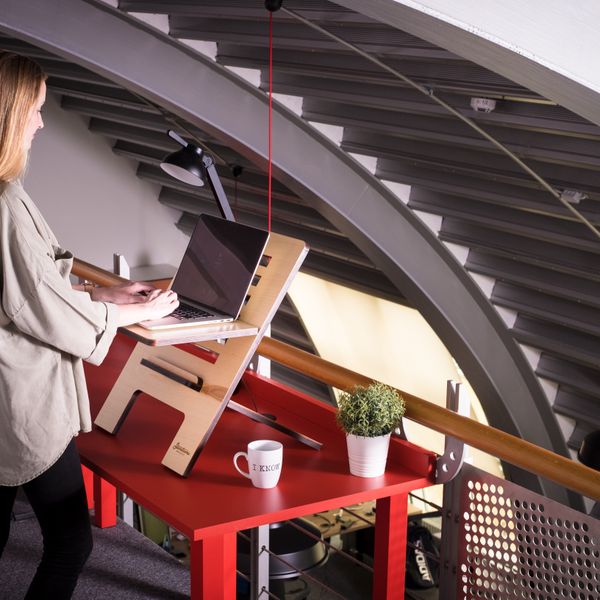
Rise Standing Desk Converter
Sit-stand, two-tier

Arc Single Monitor Arm
Gas-spring, full motion
A frame plus your own top: the value sweet spot
If you want a real full-height standing desk but balk at the price of a finished one, buy the engine and supply the body yourself. A sit-stand frame is the height-adjustable steel base — legs, crossbar and lift mechanism — designed to take any flat tabletop you bolt on. You provide the surface: a solid door blank, a hardwood kitchen worktop offcut, a laminate top from a DIY store, or a nice board you already own. The Pillar Sit-Stand Frame is this route in one box. Once you add a modest top you land around the same money as a basic complete desk, but you get a sturdier base and a surface you actually chose — dimensions, colour and edge to suit your room rather than whatever the desk maker offered. It's more effort than a converter (you'll spend an afternoon fitting the top and routing cables), and the payoff is a desk that stands and sits over its full travel instead of just lifting a shelf. For anyone who wants the finished-desk experience on a tighter budget, this is the best value on the shelf.
A full electric desk, without overpaying
Sometimes the converter and the DIY frame are false economies. If you run dual monitors, a heavy arm and a laptop dock, a converter's weight limit and shallow depth start to fight you — and a complete motorised desk is simply cleaner. One flat surface, a quiet motor and, on better models, memory presets so you tap a button to go between your seated and standing heights instead of nudging it each time. The Apex Electric Standing Desk covers this without straying into premium-brand pricing. It's the right buy when your setup is heavy or permanent, when you value the tidiest possible look, or when you know that any friction — even a few seconds of manual adjustment — will stop you switching positions. If that's you, the extra over a converter is money well spent; if you're a single-screen worker who mostly wants the option to stand, it's more desk than you need.

The accessories that decide whether you actually stand
The most common reason people stop using a standing desk isn't the desk — it's that standing on a hard floor gets uncomfortable within twenty minutes, so they quietly leave it down. An anti-fatigue mat is the fix and the single best accessory you can add. Its give encourages the constant tiny weight shifts that keep blood moving, which is what actually eases leg and lower-back fatigue during a standing stint. The Terra Anti-Fatigue Mat does exactly that and, at well under the price of the desk, it's what turns 'I have a standing desk' into 'I stand'. Don't neglect the seated half of the day either — you'll still sit for most of it. A footrest lets shorter users keep thighs supported and feet flat once the chair is raised to the right typing height; the Base Footrest handles that. And if you work off a laptop, standing makes its low screen even worse: a stand lifts the display toward eye level while you add an external keyboard. The Aero Laptop Stand solves the screen-height problem whether you're sitting or standing. None of these are luxuries — each one removes a specific reason you'd otherwise abandon the setup.
Terra Anti-Fatigue Mat
Cushioned, bevelled edge

Base Footrest
Tilting, non-slip top

Aero Laptop Stand
Aluminium, adjustable angle
Dialling in the heights and the switching
Whatever route you chose, the settings matter more than the badge. Standing, raise the surface until your elbows sit at roughly 90–100 degrees with forearms parallel to the floor — that's usually close to your standing elbow height. Your screen wants its top edge at or just below eye level, about an arm's length away, so you look slightly down rather than craning up; this is where a monitor arm earns its keep on a converter. Seated, drop everything so your forearms are level again and your feet are flat, using a footrest if the chair had to go up. The payoff isn't standing all day — it's alternating. Long static standing tires your legs and lower back just as static sitting stiffens them, so the goal is movement between the two. Start with shorter standing bouts and build up; many people settle into switching every 30–60 minutes, but there's no magic number — the best posture is genuinely the next one. Set your seated and standing heights once, note them (or save the presets), and the switch becomes a two-second habit instead of a decision.
FAQ
A converter or a full standing desk — which should I buy?
Buy a converter if you want to keep your current desk, spend the least and be able to undo it — it lifts your screen and keyboard on top of the desk you have. Choose a frame with your own top, or a complete electric desk, if you want the whole surface to rise, run a heavy multi-monitor setup, or value the tidiest look. The ergonomics are the same; you're choosing based on space, budget and how permanent the setup is.
What height should my standing desk be?
Stand naturally and raise the surface until your elbows are bent to about 90–100 degrees with your forearms parallel to the floor — for most people that's close to standing elbow height. Your monitor's top edge should sit at or just below eye level, roughly an arm's length away. Set your seated height by the same forearm rule and add a footrest if your feet don't sit flat.
Do I really need an anti-fatigue mat?
It's the accessory most likely to determine whether you keep standing. A hard floor gets uncomfortable fast and quietly pushes you back into sitting; a cushioned mat encourages the small weight shifts that reduce leg and lower-back fatigue during a standing stint. At a fraction of the desk's price, it's the highest-value add-on for any sit-stand setup.
Is standing all day better than sitting all day?
No — the benefit comes from alternating, not from standing continuously. Prolonged standing tires your legs and lower back much as prolonged sitting stiffens you, so aim to switch positions through the day rather than replace one extreme with another. This is general ergonomic guidance, not medical advice; if you have persistent or sharp pain, see a doctor or physiotherapist.